AI Job Scheduling and Customer Updates: How South Wales SMEs Can Cut Daily Operational Friction in 2026
A practical guide for South Wales SMEs using AI to tighten job scheduling, reduce internal reshuffling, and keep customers updated without adding more admin.
AI Job Scheduling and Customer Updates: How South Wales SMEs Can Cut Daily Operational Friction in 2026
For a lot of SMEs, the day does not really start when the team arrives. It starts when the first change lands.
An engineer is off sick. A customer needs to move an appointment. A job is running over. Materials are late. Somebody promised a morning visit that was never written down properly. The office starts juggling the diary, the phone starts ringing, and half the team spends the day reacting to movement rather than getting clean work done.
That is not usually seen as a strategic problem. It is treated as "just operations". But if it happens every day, it becomes one of the main reasons the business feels busier than it should for the amount of work actually being delivered.
This is exactly the sort of problem AI and workflow automation can improve.
Not by pretending software understands the trade better than your team. Not by letting an AI loose on the diary with no controls. Just by making the movement of information faster, clearer, and less dependent on memory, missed calls, and whoever happens to be holding the operational picture in their head.
For South Wales SMEs running service teams, installation crews, surveyors, engineers, mobile technicians, or multi-stop delivery work, this is one of the most commercially useful places to automate.
The real issue is not scheduling. It is operational lag.
Most businesses think the problem is the diary.
Usually it is not.
The real problem is the lag between something changing and the rest of the business responding properly.
That lag shows up in familiar ways:
- the office updates the schedule but the field team does not see the change quickly enough;
- the customer still expects the old time window because nobody confirmed the revision clearly;
- one delayed job quietly wrecks the next three appointments;
- managers get pulled into routine reshuffling because no one else has a reliable overview;
- dispatch notes, access instructions, parts status, and customer expectations live across too many places;
- the team spends more time clarifying than executing.
That is where margin leaks out.
Not in one dramatic failure. In twenty small interruptions a day.
Why this matters so much for South Wales SMEs
Many SMEs here run lean by necessity. The team is close to the work. The owner or ops lead is still near the centre of delivery. That often keeps businesses practical and commercially sharp.
The downside is that the operating model can become too dependent on a few capable people holding everything together.
If the diary lives in one person's head, or in a system only one person really trusts, every disruption becomes expensive. If customers need to ring in for basic status because your process does not update them properly, the office becomes a switchboard instead of a control point. If the field team starts each day with partial information, good people waste time solving avoidable coordination problems.
This gets worse as the business grows.
Five jobs a day can be managed with hustle. Twenty jobs a day across several people starts punishing weak process very quickly.
That is why scheduling and customer updates are such a strong automation target. They sit in the middle of sales promises, staffing reality, travel, materials, and customer confidence. Tighten that layer and the business usually feels better almost everywhere else.
Where AI is actually useful
The useful question is not whether AI can build the perfect schedule.
The better question is: which parts of the daily coordination cycle are repetitive, information-heavy, and unnecessarily manual?
Usually there are four.
1. Turning messy inputs into structured schedule changes
Most schedule changes do not arrive in a clean format.
They arrive as:
- a customer email asking to "move it to later if possible";
- a call note saying access is only available after 11;
- a message from site saying the current job will overrun;
- a supplier update that changes the install date;
- a team member reporting sickness or delay by phone or WhatsApp.
AI is useful here because it can interpret the change, extract the key details, and turn it into something operationally usable:
- which job is affected;
- what has changed;
- what time constraint now exists;
- who needs to know;
- whether the change affects the rest of the day;
- whether a customer-facing update is now required.
That removes a lot of the translation work that usually sits with office staff.
2. Recommending sensible rescheduling options
This is where people imagine AI doing magic. The reality is more practical, and more useful.
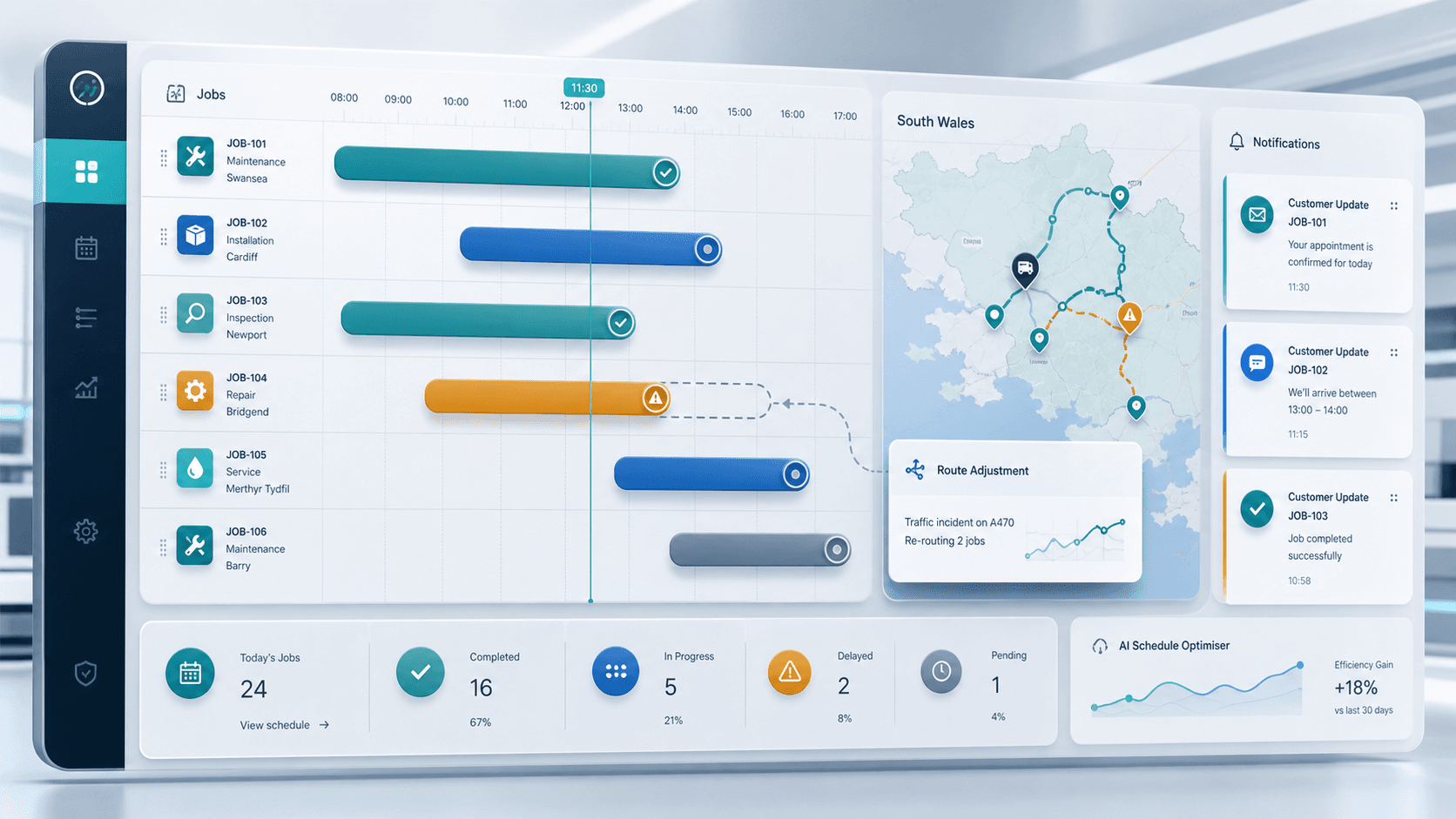
If your workflow knows job durations, travel areas, staff skills, promised windows, and known dependencies, it can suggest the next sensible move instead of making somebody rebuild the day from scratch every time something slips.
That might mean:
- moving a flexible job to the afternoon;
- swapping two visits between engineers;
- bringing forward a nearby callout;
- holding a job because materials are not confirmed;
- or escalating a clash that genuinely needs human judgement.
The goal is not to automate every scheduling decision. The goal is to reduce the amount of routine reshuffling that currently eats half the morning.
3. Sending customer updates that happen on time
This is where many businesses still underperform.
The internal team knows the day has shifted, but the customer does not. So the customer rings in. The office loses time. The customer loses confidence. Sometimes the field team ends up apologising for a delay they did not cause and cannot explain cleanly.
AI and workflow automation can improve this in a very grounded way:
- draft revised appointment messages based on the actual change;
- send ETA updates when a job is running behind or ahead;
- confirm booking windows after a reschedule;
- summarise next steps in plain English;
- escalate unusual or sensitive communications for human review first.
The point is not clever copy. The point is consistent, timely communication that stops uncertainty spreading outward.
4. Giving management a live operational picture
In a lot of SMEs, the business only knows there is a scheduling problem once the complaints start.
That is too late.
If the workflow is structured properly, AI can surface the signals earlier:
- which jobs are now at risk today;
- where one overrun is likely to create a chain reaction;
- which customers have not been updated yet;
- which engineer or crew is carrying unrealistic load;
- where too much of the day still relies on manual confirmation.
That gives the ops lead something far more useful than a noisy inbox. It gives them a ranked view of what actually needs intervention.
What a good workflow looks like
For most SMEs, the right answer is not a giant field service transformation programme.
It is something simpler and more disciplined.
- Jobs enter the schedule from your CRM, job system, enquiry workflow, or ops board.
- Changes from email, forms, phone notes, or team messages are captured into one workflow layer.
- AI extracts the change and creates a structured update.
- The system checks which jobs, people, or commitments are affected.
- Suggested rescheduling options are produced where the rules are clear.
- A human approves exceptions or sensitive changes.
- Customers receive updates automatically when appropriate.
- Management sees what changed, what is now at risk, and what still needs action.
That is not replacing your operations team. It is giving them a better operating system.
What not to automate blindly
This matters.
You should not let AI make promises your business cannot keep. You should not let it reshuffle high-value work without guardrails. You should not let it send sensitive messages without clear rules around tone, authority, and escalation.
The sensible model is:
- automate interpretation of incoming changes;
- automate routine recommendations;
- automate straightforward customer updates;
- keep humans in control of commercial decisions, unusual constraints, and anything with real downstream risk.
That is how you get speed without creating new chaos.
Where to start if your current process is mostly reactive
Do not try to automate the whole diary at once.
Start with one repeated source of friction.
Usually that is one of these:
- jobs running late without customer updates;
- engineers getting incomplete or outdated notes;
- office staff manually ringing customers about routine time changes;
- last-minute reshuffling that depends on one experienced person;
- poor visibility over which jobs are genuinely confirmed and which are still fragile.
Then ask a few plain questions:
- Where do schedule changes currently come from?
- What information is always needed to act on them?
- Which jobs can be moved easily, and which ones need approval?
- When should the customer be updated automatically?
- Where should the live status sit so everyone trusts it?
- What counts as an exception?
Once that is clear, the tooling is not especially mysterious.
In practice, the stack is often some combination of:
- your existing CRM, FSM, or scheduling system;
- a workflow layer such as n8n, Make, or Zapier;
- AI for extraction, summarisation, and decision support;
- and a simple internal dashboard or status board the team will actually use.
The priority is not software theatre. It is removing daily coordination waste.
The commercial payoff
When this works properly, the gains tend to show up fast.
You usually see:
- fewer inbound "where are you?" calls;
- less admin time spent rearranging the same day manually;
- better field productivity because teams arrive with clearer information;
- stronger customer confidence because communication feels organised;
- fewer small delays becoming full-day operational problems;
- and more capacity from the same headcount because the business is spending less energy on avoidable movement.
That is the real value.
AI in this context is not about novelty. It is about making a busy business feel less chaotic while protecting delivery quality.
For a lot of South Wales SMEs, that is a better first automation win than something more glamorous. If your team is constantly reshuffling work, chasing updates, and apologising for confusion, there is probably more value in fixing the daily flow of jobs than in adding another front-end tool.
The businesses that get this right are not necessarily the ones with the fanciest tech stack. They are the ones that decide routine operational movement should stop depending on memory and interruption.
That is a very winnable advantage.